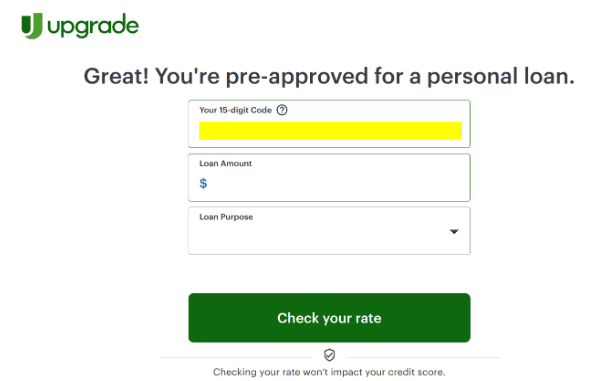
SaveWithUpgrade Offer Code: Where to Find Your 15-Digit PCN Number

If you received an Upgrade mailer directing you to savewithupgrade.com, the required code is a 15-digit Personal Confirmation Number (PCN) printed directly on your letter—not a password or promo code you create yourself.

Below: find your exact 15-digit code location across all 5 Upgrade mailer formats, how Upgrade’s1.85%–9.99% origination fee changes your actual cash deposit, and what entering your code does to your credit score.

Confused by fees or fine print on your Save With Upgrade letter?

Take a quick photo of your letter. LendMail instantly calculates your net deposit after origination fees and extracts fine print rules before you accept at savewithupgrade.com.

Scan your Upgrade mailer free →

Free · Under 1 minute · Soft inspection (no credit check)

Where to find your SaveWithUpgrade confirmation number

Many recipients get stuck looking for an "offer code." On Upgrade prescreen mailers, this is always labeled as your 15-digit Personal Confirmation Number (PCN).

  1. Check the top right corner or main callout box on page 1 of the letter.
  2. Look at the bottom response stub—the 15-digit number is usually repeated next to your address block.
  3. Type savewithupgrade.com directly into your browser address bar and enter the 15 digits under "Personal Confirmation Number".

Is entering the PCN a soft or hard credit check? Checking your rate with your PCN on savewithupgrade.com is a soft inquiry (it will not lower your score). A hard inquiry occurs only if you select a loan option and accept the final agreement.

Does the code lock in your rate? No. The PCN connects your session to your prescreen mail profile, but your final APR and funding amount are determined after verifying your income and credit profile.

Visual Code Finder: All 5 Upgrade Mailer Formats

Upgrade uses 5 distinct direct mail designs. Match the paper in your hand to the images below to pinpoint your 15-digit confirmation code.

Format 1: Standard Tri-Fold LetterMost Common
Upgrade personal loan tri-fold letter showing 15-digit PCN code in top right box

📍 Code Location:

Top right callout box on page 1, directly above your personalized rate table.

Analyzed by LendMail Code Finder

Format 2: Snap-Pack / Perforated EdgeTear-Off Envelope
Upgrade snap pack perforated mailer showing 15-digit offer code location on bottom stub

📍 Code Location:

Along the bottom perforated response stub, right next to the mail-in voucher address.

Analyzed by LendMail Code Finder

Format 3: Convenience Check MailerLive Check Voucher
Upgrade live check mailer showing Personal Confirmation Number near interest terms

📍 Code Location:

In the boxed Truth in Lending summary section on the front of the attached check stub.

Analyzed by LendMail Code Finder

Format 4: Large Postcard NoticeCard Format
Upgrade postcard invitation showing 15-digit PCN number above address block

📍 Code Location:

Directly above your recipient mailing address block in the highlighted white box.

Analyzed by LendMail Code Finder

Format 5: Debt Consolidation StatementRefinance Offer
Upgrade debt consolidation offer statement showing PCN confirmation code location

📍 Code Location:

In the top header bar next to the SaveWithUpgrade.com website URL instructions.

Analyzed by LendMail Code Finder

Watch: Locating your code and reviewing Upgrade terms

Quick walkthrough on finding your 15-digit PCN and verifying loan terms with LendMail.

Is savewithupgrade.com legit?

Yes. SaveWithUpgrade.com is Upgrade’s official response path for direct mail campaigns. It is not a third-party lead generation site or scam.

However, note that Upgrade is a financial technology company, not a bank. Loans are issued by FDIC-insured bank partners such as Cross River Bank or Blue Ridge Bank.

Origination Fee Breakdown: How much cash do you actually get?

The headline number on the envelope is your total loan amount, but Upgrade deducts a one-time origination fee (1.85% to 9.99%) directly from your payout before sending cash to your bank account.

Loan TermsUpgrade DisclosuresReal Impact on Your Wallet
Origination Fee1.85% – 9.99%Deducted from proceeds. On a $10,000 loan with an 8% fee, you receive $9,200 in cash, but you still pay interest on the full $10,000.
APR Range~7.74% – 35.99%Your rate depends on credit history. Opting for autopay or direct creditor payoff can reduce your overall rate.
Prepayment PenaltiesNoneYou can pay off the balance early without penalty, but note that origination fees are non-refundable.

Scanning the QR Code on your Save With Upgrade letter?

Mail QR codes contain tracking metadata (`utm` tags and response tokens). LendMail’s QR Inspector allows you to inspect the exact destination URL before you visit.

Inspect Upgrade QR code →

Frequently asked questions (Code & Application Confusion)

What if my SaveWithUpgrade letter doesn't have a 15-digit code?

Some mailers use shorter campaign identifiers or personalized QR links. If you cannot locate a 15-digit PCN, go directly to Upgrade.com to run a standard rate check.

Can I apply for SaveWithUpgrade over the phone?

Yes. Your physical mailer typically lists a toll-free number alongside your PCN. You can speak to an Upgrade representative directly and provide your 15-digit confirmation code over the phone.

Why was I turned down after entering my SaveWithUpgrade code?

Prescreened letters are based on preliminary credit data. If your credit score dropped, recent debts increased, or income could not be verified during the full review, your application may still be declined.

Check your offer before you apply

Upload or scan your Save With Upgrade letter to verify net cash funding, origination fee calculations, and full disclosures.

Scan this Upgrade offer →

Related: Aspire credit card acceptance code · Upstart offer code · Opt out of prescreen mail

Holding a credit offer?Inspect QR parameters before scanning
📷 Scan Mailer